Learning how to pack electronics for camping is essential for ensuring your devices remain functional and protected throughout your outdoor adventure. Proper preparation not only maximizes convenience but also safeguards sensitive equipment from the elements and damage. By understanding the best practices for organizing, protecting, and managing power sources, campers can enjoy their trip without unnecessary technical worries.
This comprehensive guide covers everything from selecting the right electronic devices and packing techniques to safety measures and power management solutions, helping you stay connected and prepared in remote locations.
Essential electronics to pack for camping
Equipping yourself with the right electronic devices is crucial for a safe, comfortable, and enjoyable camping experience. Modern electronics can assist with navigation, communication, illumination, and weather updates, ensuring you stay connected and prepared regardless of the environment. Selecting the appropriate gadgets and power sources can significantly enhance your outdoor adventure while maintaining ease of packing.
When choosing electronics for camping, it is important to prioritize devices that are durable, energy-efficient, and lightweight. Compact gadgets are easier to pack and carry, which is especially beneficial when space and weight are limited. The right combination of essential electronics can provide safety, convenience, and entertainment during your outdoor excursion.
Essential electronics for camping
Camping trips often involve navigating unfamiliar terrain, managing unpredictable weather, and staying connected with loved ones or emergency services. Therefore, the following electronics are considered essential for most outdoor adventures:
- GPS Devices: Handheld GPS units help you navigate accurately without relying solely on mobile signals. They are especially useful in remote areas where cell coverage may be limited or nonexistent. Many GPS units also include topographical maps, waypoint marking, and compass features.
- Portable Chargers: Power banks or portable solar chargers are vital for keeping your devices charged throughout the trip. Since power sources are often unavailable in remote locations, having a reliable energy backup ensures continuous access to communication and navigation tools.
- Headlamps and Flashlights: Proper lighting is essential for safety and convenience during nighttime activities. Headlamps free up your hands for setting up tents or cooking, while compact flashlights serve as backup sources of light.
- Weather Radios: These radios provide real-time weather updates, alerts, and emergency broadcasts. Compact and battery-operated, weather radios can be a critical safety device during storms or severe weather conditions.
Comparison of portable power banks suitable for camping
Choosing a portable power bank with suitable features ensures your devices remain charged during extended outdoor stays. The following table compares popular models based on capacity, weight, charging speed, and additional features, assisting you in selecting the best option for your needs:
| Model | Capacity (mAh) | Weight (g) | Charging Speed | Additional Features |
|---|---|---|---|---|
| Anker PowerCore 20100 | 20,100 | 350 | Fast Charge (PowerIQ) | High capacity, dual USB ports |
| RAVPower 20000mAh | 20,000 | 360 | Quick Charge 3.0 | Compact design, multiple device compatibility |
| Anker PowerCore Slim 10000 | 10,000 | 180 | Fast Charge | Lightweight, slim profile |
| Goal Zero Sherpa 100AC | 23,000 | 2,250 | Multiple ports, AC power | Includes AC outlet, solar panel compatibility |
Note: For extended camping trips, a higher capacity power bank (above 20,000mAh) combined with solar charging capabilities provides reliable power and flexibility.
When selecting a power bank, consider the balance between capacity and portability. Lighter models with sufficient capacity are ideal for backpacking, whereas larger units with more ports and higher power output are suitable for car camping or base camps. The integration of solar panels in some models offers an environmentally friendly and renewable energy source, which can be particularly advantageous in remote locations without access to electrical outlets.
Packing Methods and Organization Strategies

Efficient packing of electronics and their accessories is essential for a smooth camping experience. Proper organization not only protects your devices but also ensures quick access when needed, saving time and reducing stress during your outdoor adventure. Adopting strategic packing techniques can help you maximize space, safeguard fragile items, and keep everything orderly throughout your trip.A well-structured packing approach involves categorizing electronics based on their function and fragility, choosing appropriate containers, and arranging items systematically within your camping bag.
This organized method prevents damage, minimizes clutter, and allows you to find your gadgets effortlessly amidst the wilderness or campsite.
Effective Techniques for Organizing Electronics and Accessories
Organizing electronics efficiently begins with a clear understanding of their specific storage needs. Here are some proven techniques:
- Designate dedicated compartments: Use different sections of your backpack or dedicated pouches for items like chargers, batteries, cables, and devices. This separation prevents tangling and makes it easier to locate specific accessories quickly.
- Utilize cable management tools: Employ cable ties, Velcro straps, or twist ties to keep cords tidy and prevent knots. Wrap cables loosely to avoid damaging internal wires.
- Label your storage containers: Clearly label pouches or boxes to identify their contents at a glance. For example, label one container “Charging Cables” and another “Camera Accessories.”
- Prioritize accessibility: Pack frequently used items such as power banks or smartphones in easily reachable compartments, while less-used items can be stored in the main compartment or bottom of the bag.
- Use protective sleeves or pouches: Store fragile electronics like cameras or portable speakers in padded sleeves within your pack to mitigate shocks and impacts.
Step-by-Step Guide to Categorizing and Packing Fragile Electronics Safely
Safeguarding fragile electronics during outdoor activities requires meticulous packing. Follow these steps to ensure maximum protection:
- Sort and categorize: Separate fragile items such as cameras, portable speakers, and delicate chargers from bulkier or more durable equipment.
- Use protective containers: Place each fragile item in padded cases, hard-shell containers, or lined pouches designed for electronics. Ensure that the containers have sufficient padding around the devices.
- Wrap with soft padding: For added safety, wrap devices in soft materials like microfiber cloths or foam inserts before placing them into protective shells.
- Position carefully within your bag: Place the protected electronics in the center of your backpack, surrounded by soft clothing or other cushioning materials to absorb shocks.
- Secure with additional straps: Use internal straps or compression bands to hold fragile containers firmly in place, preventing movement during hiking or transportation.
- Minimize exposure to elements: Keep fragile electronics in sealed, waterproof pouches or zippered compartments to prevent damage from moisture or dust.
Packing Containers and Their Uses
Effective organization relies heavily on the choice of packing containers suited to specific electronic items. The following table illustrates different packing containers and their optimal uses:
| Container Type | Uses | Advantages |
|---|---|---|
| Zippered Pouches | Organization of cables, small accessories, and chargers | Lightweight, flexible, and easy to access; available in various sizes and colors for easy identification |
| Hard Cases | Protection of fragile electronics like cameras, GPS devices, or portable speakers | Superior shock absorption, waterproof options, and secure closures |
| Lined Sleeve Pouches | Safeguarding delicate gadgets such as smartphones, compact cameras, or headphones | Soft padding minimizes scratches and minor impacts, lightweight and portable |
| Mesh Bags | Storing accessories that need ventilation, such as batteries or power banks | Visibility of contents, breathable, and prevents moisture buildup |
| Foam Inserts | Custom protection for specific delicate equipment, especially in hard cases | Customized cushioning, excellent shock resistance, reusable and adaptable |
Protection and Safety Measures for Electronics

Ensuring the safety of electronic devices during outdoor adventures is vital to prevent damage and maintain functionality throughout your camping trip. Proper protection against water, dirt, and impact not only extends the lifespan of your electronics but also guarantees their reliable operation when needed most. Implementing effective safety measures involves selecting suitable protective equipment, employing proper packing techniques, and conducting thorough checks before departure to confirm that all devices are functioning correctly.Electronics are vulnerable to a variety of outdoor hazards that can impair performance or cause irreversible damage.
Water exposure, dirt particles, and impact from accidental drops are among the most common threats faced during camping. Therefore, adopting a proactive approach to safeguarding your devices enhances your overall camping experience by minimizing technical issues and ensuring that your electronics remain in optimal condition.
Protective Cases, Waterproof Bags, and Padding Materials
The use of appropriate protective gear is fundamental in shielding electronics from environmental hazards encountered during camping. Protective cases, waterproof bags, and padding materials are indispensable tools for outdoor electronics safety.When choosing protective cases, opt for those made from impact-resistant materials such as high-grade silicone, rubber, or polycarbonate. These cases absorb shocks from accidental drops and prevent physical damage to delicate components.
For added security, select cases with secure closures and weather-resistant seals to prevent ingress of moisture and dirt.Waterproof bags and pouches are crucial for safeguarding electronics from water exposure, especially during activities near water bodies or in rainy conditions. These bags are typically made of durable, waterproof fabrics with sealed seams and waterproof zippers. They provide an extra layer of protection for devices like smartphones, tablets, and portable chargers.Padding materials such as foam inserts, bubble wrap, or soft cloths serve to cushion electronics within protective cases or bags.
Proper padding absorbs impact forces, reducing the risk of damage from shocks or vibrations during transport. Carefully wrapping devices with these materials ensures they are securely held in place and protected from sudden jolts.
- Impact-resistant cases: Use high-quality cases designed to withstand shocks and drops, ensuring the safety of fragile electronics.
- Waterproof storage solutions: Employ waterproof pouches and bags to protect devices from rain, splashes, and accidental submersion.
- Padding materials: Incorporate foam, bubble wrap, or soft fabrics to cushion electronics within protective enclosures.
- Sealing and closures: Ensure waterproof bags have secure zippers or sealing mechanisms to prevent moisture ingress.
Procedures for Testing Electronics Before Departure
Verifying the functionality of electronic devices prior to departure is an essential step to avoid inconveniences during your camping trip. Testing ensures that all devices are operational, properly charged, and free from defects that could hinder their use in the field.Begin by inspecting each device visually for signs of physical damage such as cracks, corrosion, or loose components. Confirm that batteries are fully charged, or carry spare batteries and portable chargers to maintain power throughout your adventure.Perform basic functionality tests by turning on the devices and checking critical features.
For example, verify that smartphones can connect to networks, GPS modules are responsive, and cameras operate correctly. For electronics with sensitive equipment like sensors or specialized gear, conduct calibration and testing procedures to ensure accurate performance.To guarantee readiness:
- Charge all devices fully before departure to prevent power loss during use.
- Utilize built-in diagnostic tools or apps to assess battery health and operational status.
- Record serial numbers and take photographs of devices and their settings for quick identification and troubleshooting if needed.
- Pack spare batteries, power banks, or solar chargers to extend usage during the trip.
Incorporate a checklist to confirm that each electronic item has been tested and prepared, reducing the risk of missing essential devices or encountering unforeseen failures in the wilderness.
“Pre-trip testing and protection of electronics are fundamental practices that safeguard your devices against outdoor hazards and ensure their reliable operation during your camping adventure.”
Power management and charging solutions
Effective power management is essential for maintaining the functionality of electronic devices during camping trips, especially in remote areas where power sources are limited. Selecting appropriate charging solutions ensures that devices such as GPS units, smartphones, cameras, and portable lights remain operational throughout the adventure. Understanding the available options allows campers to plan their charging strategies efficiently, balancing convenience, capacity, and weight considerations.
Various portable charging methods have become popular among outdoor enthusiasts, each offering unique advantages suited for different camping scenarios. From renewable energy sources like solar chargers to compact power banks and vehicle adapters, these solutions provide flexibility and reliability for keeping electronics powered during extended stays in nature. The following comparison table highlights key specifications and features of common charging options, aiding in informed decision-making for campers.
Comparison of Portable Charging Methods
| Charging Method | Capacity | Weight | Durability | Additional Features |
|---|---|---|---|---|
| Solar Charger | 10,000-25,000 mAh (for portable panels) | 200-700 grams | High, with water and dirt-resistant models available | Renewable energy source; requires sunlight; some models include foldable panels and multiple USB outputs |
| Power Bank | 5,000-30,000 mAh | 150-400 grams | Moderate, with rugged designs for outdoor use | Portable, fast charging options, multiple device outputs, LED indicators |
| Car Adapter (12V/DC to USB) | Dependent on vehicle’s power outlet | Typically less than 100 grams | High, if used with appropriate surge protection | Convenient when camping near a vehicle, allows charging devices directly from vehicle’s battery |
Choosing the right charging solution depends on the camping duration, availability of sunlight, weight preferences, and the power requirements of your electronic devices. Solar chargers are ideal for extended stays with ample sunlight, while power banks offer reliable backup power in shaded or cloudy conditions. Car adapters are convenient when vehicles are accessible, providing quick recharging options without adding significant weight to your gear.
Tips for Conserving Battery Life in Remote Areas
Optimizing the battery life of electronic devices is crucial for prolonged camping trips, especially in locations where recharging options are scarce. Implementing practical strategies can significantly extend device usage and prevent unexpected power loss.
- Enable power-saving modes on smartphones and other devices to reduce background activity and screen brightness.
- Limit the use of non-essential apps and functions, such as Bluetooth, Wi-Fi, and location services, when not needed.
- Turn off devices completely when not in use, especially during extended periods of inactivity.
- Use airplane mode to conserve battery while still maintaining basic functions like alarm or offline maps.
- Charge devices during peak sunlight hours using solar chargers to maximize energy capture.
- Carry spare batteries or portable power sources, and strategize charging times around daily activity patterns.
Tip: Keeping devices in a cool, dry place when not in use helps preserve battery health and prolongs their operational life during the trip.
Special considerations for electronic devices
When preparing electronic devices for outdoor camping, it is crucial to account for their sensitivity and vulnerability to environmental factors. Devices such as cameras, tablets, and satellite phones are valuable tools that need careful handling to ensure they remain functional throughout the trip. Proper packing strategies not only safeguard these electronics from physical damage but also help maintain their operational integrity despite outdoor conditions.Protecting delicate electronic devices involves a combination of physical safeguards and environmental precautions.
The outdoor environment presents unique challenges, including exposure to dust, moisture, temperature fluctuations, and accidental impacts. Addressing these considerations proactively ensures that devices perform reliably and avoid costly damages during camping adventures.
Handling sensitive equipment like cameras, tablets, and satellite phones
Sensitive electronic devices should be treated with extra care, especially when exposed to rough outdoor conditions. Proper packing starts with selecting the right protective containers and organizing devices to prevent movement and impact during transit. Use padded cases or dedicated compartments within your camping gear to cushion devices from shocks and vibrations. It is essential to avoid stacking heavy objects on top of delicate electronics, which could cause cracks or internal damage.Furthermore, temperature control is vital.
Extreme heat or cold can impair battery life and damage internal components. Devices should be stored in insulated, temperature-controlled environments whenever possible. Keeping devices in a dedicated, easily accessible compartment helps prevent accidental drops and allows quick access when needed.
Protecting delicate screens and lenses from damage
Screens and lenses are particularly susceptible to scratches, impacts, and environmental contaminants. To preserve their clarity and functionality, applying protective films or covers designed specifically for outdoor use is highly recommended. These accessories serve as a first line of defense against abrasions, dust, and moisture.Use high-quality, anti-scratch films for screens, which are easy to apply and remove without leaving residue.
For camera lenses, installing durable lens covers or filters can significantly reduce the risk of scratches and dust accumulation. These covers should be made from materials like tempered glass or polycarbonate, offering excellent protection without compromising image quality.
Installing protective films and lens covers for outdoor conditions
Proper installation of protective films and lens covers is critical for ensuring maximum durability and clarity. Begin by cleaning the surface thoroughly with a lint-free cloth and a gentle cleaning solution to remove any dust or oils that might interfere with adhesion. Carefully align the film or cover to avoid trapping air bubbles or misalignments that could impair device usability.For screens, anti-glare and hydrophobic protective films are especially beneficial in outdoor settings, as they reduce glare from sunlight and repel water droplets.
When selecting lens covers, opt for filters with scratch-resistant coatings and UV protection, which can also help enhance image quality in bright conditions.Install lens covers by gently pressing from the center outward, ensuring the edges adhere smoothly without trapped air or dust. Regularly inspect and replace protective films and covers as needed, especially after exposure to harsh elements, to maintain optimal protection and clarity.
Properly protected screens and lenses contribute significantly to the longevity of electronic devices during outdoor excursions.
Maintenance and Troubleshooting Tips
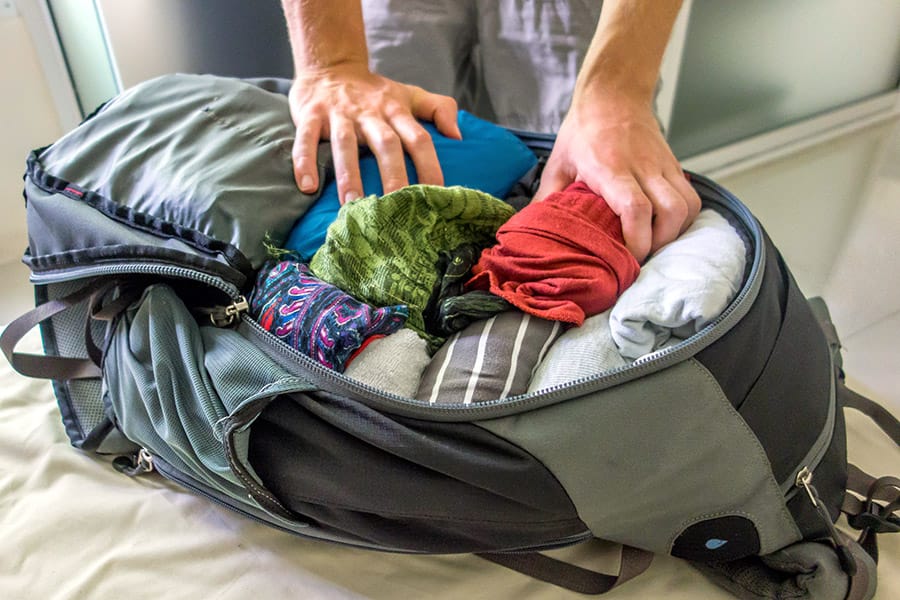
Proper maintenance and troubleshooting of electronics during camping ensure the longevity and reliable performance of your devices. Outdoor environments can expose electronics to dust, moisture, and impacts, which may lead to operational issues. Implementing effective cleaning routines and troubleshooting procedures can help you quickly resolve problems and keep your electronics functioning optimally throughout your outdoor adventure.Maintaining your electronic devices involves regular cleaning, careful inspection, and following safety protocols to prevent damage.
Troubleshooting requires understanding common issues faced in outdoor settings and applying systematic steps to identify and resolve them efficiently. Being proactive in maintenance and prepared to troubleshoot enhances your overall camping experience by minimizing device downtime and preventing potential damage.
Cleaning and Maintaining Electronics During and After Camping
Ensuring your devices stay clean and well-maintained is essential for their durability and performance. Dust, dirt, and moisture are prevalent in outdoor environments and can impair device functionality if not managed properly.
- Regularly wipe down electronic devices with a soft, lint-free cloth to remove dust and dirt. Use a slightly damp cloth for stubborn grime, avoiding excess moisture that could seep into openings.
- Utilize compressed air to gently blow out dust from ports, vents, and connectors, helping to maintain proper airflow and prevent overheating.
- Inspect charging cables, adapters, and protective cases for signs of wear or damage that could compromise safety or performance.
- After each trip, thoroughly dry devices and accessories, especially if exposed to rain or humidity. Place items in a well-ventilated area or use silica gel packets to absorb residual moisture.
- Store electronics in protective cases or dry pouches when not in use to shield them from dust and impacts during transportation and storage.
- Conduct periodic checks on battery health, ensuring they are not swollen or leaking, which could indicate the need for replacement.
Common Issues and Solutions for Outdoor Electronics
Outdoor electronic devices are susceptible to specific problems caused by environmental exposure, handling, and power fluctuations. Recognizing common issues and applying appropriate solutions can prevent device failure and extend their lifespan.Some of the most frequently encountered problems include:
- Battery Drain or Failure: External temperature extremes can affect battery performance, causing rapid drain or failure. Solution: Store devices in a cool, dry place and avoid overcharging or deep discharging batteries.
- Corrosion of Connectors and Ports: Moisture exposure leads to corrosion, impairing connectivity. Solution: Clean ports with isopropyl alcohol and a soft brush, and prevent moisture ingress with protective covers.
- Overheating Devices: Prolonged use under direct sunlight or in high temperatures can cause overheating. Solution: Use shade or cooling methods, and avoid operating devices in hot environments.
- Screen or Display Malfunctions: Dust or impact can damage screens. Solution: Gently clean with a microfiber cloth and use screen protectors to prevent scratches.
- Charging Issues: Faulty cables or power sources can hinder charging. Solution: Test with multiple cables and outlets, and replace damaged accessories promptly.
Troubleshooting Procedures Organized in a Flowchart Format
A structured troubleshooting approach allows for quick identification and resolution of problems encountered with electronic devices during camping. The following table presents a step-by-step flowchart to guide you through common issues systematically:
| Step | Action | Decision Point | Next Step |
|---|---|---|---|
| 1 | Check if the device is powered on | Device is off | Charge the device or switch it on |
| 2 | Verify power source and charging cable | Charging cable or power source is faulty | Replace cable or try a different outlet |
| 3 | Inspect for visible damage or corrosion | Damage or corrosion present | Clean ports with alcohol, replace damaged parts |
| 4 | Test device in different environment (shade, cooler area) | Device still overheating or malfunctioning | Allow device to cool, avoid prolonged use in heat |
| 5 | Perform a reset or soft reboot | Device continues to have issues | Perform a factory reset or consult professional repair |
| 6 | Check for software updates or firmware issues | Updates available | Download and install updates |
| 7 | Evaluate battery health and replace if necessary | Battery is swollen or not holding charge | Replace battery and retest device |
Important: Always power off devices before cleaning or inspecting ports to prevent electrical damage. Use non-abrasive tools and avoid excessive moisture to protect delicate electronic components.
Closure

In summary, packing electronics for camping requires careful planning and organization to ensure safety, functionality, and convenience. With the right tools, protective gear, and power solutions, you can enjoy the outdoors while keeping your devices secure and operational. Properly prepared, your camping experience will be enhanced by seamless connectivity and peace of mind.